How I Got iRacing Telemetry Streaming into ATLAS Viewer#
This started because I asked our designated sim racer, Oli, if he had any SSN2 files from his runs I could pull into ATLAS and poke at. He did not send me SSN2 files. He sent me a link to the iRacing SDK and down the rabbit hole I went. Three days later, I had a working bridge service that streams live iRacing telemetry into ATLAS through the Stream API.
iRacing (shared memory) → pyirsdk → Python Bridge → Stream API (gRPC) → Kafka → ATLAS
This post is everything I learned getting it working. Including the parts where I was misreading the protocol and had to work backwards from Kafka to figure out what the library actually wanted.
The setup#
The backend is four Docker containers. No Zookeeper — Kafka runs in KRaft mode.
services:
  kafka:
    image: apache/kafka:latest
    ports:
      - "9092:9092"
    environment:
      KAFKA_PROCESS_ROLES: broker,controller
      KAFKA_NODE_ID: 1
      # ... KRaft config

  stream-api:
    image: atlasplatformdocker/streaming-proto-server-host:latest
    ports:
      - "13579:13579"
    volumes:
      - ./configs:/configs

  key-generator:
    image: atlasplatformdocker/keygenerator-proto-server:latest
    ports:
      - "15379:15379"

  kafka-ui:
    image: provectuslabs/kafka-ui:latest
    ports:
      - "8080:8080"
The Stream API accepts telemetry via gRPC, manages sessions, tracks data formats, and writes to Kafka topics that ATLAS consumes. The Key Generator provides unique identifiers for configuration packets. Kafka UI is optional but you'll want it — watching messages flow through topics is the fastest way to debug this stuff.
The bridge runs natively on Windows because it has to. iRacing exposes telemetry through Windows shared memory, and pyirsdk reads it directly. No network round-trips, no plugins, just raw memory access.
Reading from iRacing#
iRacing gives you a dict-like interface to ~200 telemetry variables through shared memory. The pyirsdk library handles the mapping. Reading is fast — the interesting part is deciding what to send.
I mapped ~120 variables into ATLAS parameter definitions:
@dataclass
class ChannelDef:
    iracing_key: str          # "Speed"
    atlas_identifier: str     # "Speed:iRacing"
    atlas_name: str           # "Speed"
    atlas_app: str            # "iRacing"
    units: str                # "m/s"
    description: str
    format_string: str        # "%6.2f"
    min_value: float
    max_value: float
    frequency: int            # 60
    group: str                # "Motion"
52 of those channels are tyres alone — 13 per corner covering surface temps across three zones, carcass temps, wear, cold pressure, shock deflection, shock velocity, and brake line pressure. If you've ever wondered why tyre strategy in real motorsport is complex, try staring at 52 simultaneous traces and realising teams are making decisions off all of them.
I built presets so you don't have to stream everything: "essential" gives you ~20 key channels, or you can go full send with all 120.
The protocol: five steps, exact order#
The Stream API speaks protobuf over gRPC. The session lifecycle has a specific sequence, and the order matters more than you'd think.
1. Create the session#
resp = session_stub.CreateSession(
    api_pb2.CreateSessionRequest(
        data_source="Default",
        identifier="Spa - McLaren 720S GT3 - 2026-03-27 14:30",
        type="Session",
        version=1,
    )
)
session_key = resp.session_key
The identifier shows up in ATLAS's session browser. I auto-generate it from track, car, and timestamp.
2. Announce the session#
NewSessionPacket goes to both streams. This is how ATLAS discovers a session exists.
new_sess = open_data_pb2.NewSessionPacket(data_source="Default")
write_pkt(new_sess, stream="Stream1")
write_pkt(new_sess, stream="")        # main stream
time.sleep(1)  # let it propagate
3. Send the configuration#
This declares every parameter you'll stream. ATLAS won't interpret any data without it.
config_id = keygen_stub.GenerateUniqueKey(
    key_generator_pb2.GenerateUniqueKeyRequest(
        type=key_generator_pb2.KEY_TYPE_STRING
    )
).string_key

config_pkt = open_data_pb2.ConfigurationPacket(
    config_id=config_id,
    parameter_definitions=param_defs,
    group_definitions=[
        open_data_pb2.GroupDefinition(
            identifier="iRacing",
            application_name="iRacing",
            name="iRacing",
            description="iRacing telemetry",
        )
    ],
)
write_pkt(config_pkt, stream="", essential=True)
4. Register data formats#
Each parameter gets a data format identifier. This links parameter definitions to data packets.
for ch in channels:
    resp = dfmt_stub.GetParameterDataFormatId(
        api_pb2.GetParameterDataFormatIdRequest(
            data_source="Default",
            parameters=[ch.atlas_identifier],
        )
    )
    data_format_ids[ch.atlas_identifier] = resp.data_format_identifier
5. Stream data#
One PeriodicDataPacket per parameter, each carrying an array of samples:
data_pkt = open_data_pb2.PeriodicDataPacket(
    data_format=open_data_pb2.SampleDataFormat(
        data_format_identifier=dfmt_id
    ),
    start_time=timestamp_ns,
    interval=interval_ns,   # 16,666,666 ns for 60 Hz
    columns=[col],
)
write_pkt(data_pkt, stream="Stream1")
Straightforward, right? Here's where I actually spent my time.
The contract I had to learn#
The Streaming Support Library is a contract. It has invariants that aren't obvious from the reference docs until you reason about how SQLRace indexes data and how the Stream Recorder handles topic subscriptions. Most of my debugging time was spent discovering those invariants by diffing my bridge against a working sample. Here are the ones that cost me the most hours.
One GroupDefinition per config packet#
My first instinct was to create separate GroupDefinition entries for each telemetry category — Motion, Engine, Tyres, etc. Seemed like the right thing to do. It isn't: the library expects exactly one group per ConfigurationPacket.
The symptom was the session appearing with zero parameters and FlushSlotsAsRequired - slots flushed 0 repeating in the logs. I spent hours comparing packet bytes against a working test injector before landing on it. I tested with 2, 7, and 12 groups — all rejected the same way. One group, any number of parameters inside it — works immediately.
Once I saw it, it made sense: the group is a session-level organisational container, not a per-parameter one. Parameter organisation happens through naming and application_name, not through multiple groups. If you're integrating with the Streaming Support Library and your session shows up but your parameters don't, this is the first thing to check.
config_id wants a real unique key#
I initially used config_id="ConfigPacket" — a hardcoded string, because the field takes a string and that seemed fine. The test injector that worked was generating a unique ID through the Key Generator service, which is what the field is actually designed for. One-line fix, but finding it meant diffing serialised protobuf by hand. The Key Generator exists for a reason; use it.
Gaps in the traces#
My first version grabbed time.time_ns() at the start of each batch. This produced visible gaps in ATLAS — the traces had breaks at every batch boundary because wall-clock time doesn't perfectly align with sample intervals.
# Wrong: gaps between batches
batch_start_ns = time.time_ns()

# Right: each batch starts where the last one ended
batch_start_ns += interval_ns * batch_size
Small fix, big visual difference. The traces went from choppy bars to continuous lines.
Packet routing#
Different packets go to different streams. Get this wrong and ATLAS either doesn't see the session or doesn't see the data:
| Packet | Stream | Essential |
|---|---|---|
NewSessionPacket |
Both (Stream1 + "") |
No |
ConfigurationPacket |
Both (Stream1 + "") |
Yes |
PeriodicDataPacket |
Data (Stream1) |
No |
MarkerPacket |
Both (Stream1 + "") |
Yes |
EndOfSessionPacket |
Both | No |
Testing without a car#
You can't iterate on a streaming protocol by doing hot laps. I built a test injector that pushes synthetic data — sine waves, linear ramps — through the exact same pipeline:
FAKE_CHANNELS = {
    "Speed:iRacing":     {"fn": lambda t: 40 + 35 * math.sin(t * 0.3)},
    "RPM:iRacing":       {"fn": lambda t: 7000 + 4000 * math.sin(t * 0.5)},
    "Throttle:iRacing":  {"fn": lambda t: max(0, math.sin(t * 0.8))},
    "FuelLevel:iRacing": {"fn": lambda t: max(0, 80 - t * 0.3)},
}
Every protocol issue I hit was caught here first. No sim required.
Lap detection#
ATLAS supports marker packets — timestamped events on the trace timeline. I watch iRacing's Lap counter and OnPitRoad flag to detect lap completions and pit stops:
marker = open_data_pb2.MarkerPacket(
    timestamp=timestamp_ns,
    label="Lap 5",
    type="Lap Trigger",
    description="Lap completed",
    source="0",
    value=5,
)
These create lap boundaries in the session. ATLAS splits the timeline into laps so you can overlay them, compare sector times, and do lap-by-lap analysis.
Config has to follow the data#
The Out Lap marker — sent during session creation — showed up fine. But every subsequent lap marker was a no-op. I could see the markers landing in Kafka. The packets were structurally identical to the Out Lap. They just weren't creating lap boundaries.
The issue was the ConfigurationPacket. I'd been sending it to the main stream only, following the pattern in the reference sample. That works for the Out Lap because the Out Lap lives on the main stream alongside the config. Subsequent markers go out on the data stream — and SQLRace processes each Kafka topic independently, so it needs the config on every stream where it writes data. No config on the data stream meant no interpretive context for anything arriving there, markers included.
Once I saw the architecture, the rule was obvious: wherever data flows, config has to precede it. One line fixed it — send the config to both streams:
config_bytes = config_pkt.SerializeToString()
write_pkt(config_bytes, stream="", essential=True)
write_pkt(config_bytes, stream="Stream1", essential=True)
Same pattern as NewSessionPacket and EndOfSessionPacket, which already went to both streams. The config just wasn't in the club yet.
Making the traces smooth#
The bridge was working end to end. Data was flowing into ATLAS, the session browser showed my laps, parameters were drawing. But the traces didn't look smooth. The lines were jittery, staggered, showing up as disconnected dots rather than continuous curves. I went through three iterations to fix it.
Attempt 1: One sample per packet, wall-clock timestamps. My first approach sent a single PeriodicDataPacket per parameter per tick, timestamped with time.time_ns(). The problem is that time.sleep(1/60) doesn't guarantee a precise 16.67ms wait — OS scheduling adds jitter, so consecutive timestamps weren't evenly spaced. ATLAS saw irregular gaps and rendered dots instead of lines.
Attempt 2: Synthetic timestamps, still one sample per packet. I switched to a synthetic timestamp — epoch_ns + sample_count * interval_ns — so every sample was mathematically exactly one interval apart. The dots connected into lines, but the delivery was still uneven. The data would arrive in bursts because the actual send timing was still subject to OS jitter, causing visible stutter in the live view.
Attempt 3: Batched packets matching the ATLAS sample writer. I looked at the sample_writer and the pattern clicked. They collect multiple samples — paced to real-time with sleeps between each read — then send them as a single PeriodicDataPacket containing the full array. The start_time advances by exactly interval * sample_count after each batch. No wall-clock drift, no timestamp jitter, and ATLAS receives a dense block of contiguous data it can render smoothly.
# Collect one second of samples at 60 Hz, paced in real-time
for _ in range(batch_size):
    t0 = int(time.time() * 1e9)
    telemetry = iracing.read_telemetry(keys)
    for k in keys:
        batch[k].append(float(telemetry.get(k)))
    t1 = int(time.time() * 1e9)
    sleep_ns = interval_ns - (t1 - t0)
    if sleep_ns > 0:
        time.sleep(sleep_ns / 1e9)

# Send as one packet, advance timestamp arithmetically
atlas.send_periodic_data(batch, first_timestamp_ns, interval_ns)
first_timestamp_ns += interval_ns * batch_size
The key insight: ATLAS needs the packet to contain contiguous samples with an exact interval. How you pace delivery to the API is secondary — what matters is that each PeriodicDataPacket describes a clean, gapless block of data. One sample per packet means ATLAS has to infer continuity across packets, and any timestamp wobble breaks the chain.
I also added incrementing packet IDs to every Packet wrapper — another pattern from the sample writer that I'd been missing. Small thing, but the sample code does it for a reason.
The bits I still had wrong#
With the bridge streaming smoothly, I asked one of our engineers to review the code for anything that wouldn't survive contact with production. He came back with a PR that made three changes — each one solving a real problem I hadn't noticed yet.
Sample timestamps should come from the reader, not the sender#
Attempt 3 above arrives at an arithmetic anchor: initialise first_timestamp_ns once, advance it by interval_ns * batch_size after every send. Gapless by construction. Works.
But it's gapless in a slightly dishonest way. The timestamps describe a perfectly uniform grid; the actual reads don't land on that grid because of OS sleep jitter in the read loop. For most traces it doesn't matter — ATLAS renders them smooth either way. For anything that correlates across parameters at high resolution, it does.
The better pattern, which he pointed out iRacing's hardware pacing actually supports: stamp each sample at the moment of the freeze_var_buffer_latest call, carry that timestamp on a SampleValue dataclass, and derive each batch's start_time from the first sample. Because iRacing's shared memory updates at a hardware-paced 60 Hz, consecutive reads are ~16.67 ms apart in practice — the timestamps are gapless and honest about when each sample was actually taken.
# inside iracing_reader.py
timestamp_ns = int(time.time() * 1e9)
for key in keys:
    result[key] = SampleValue(timestamp_ns, key, float(self._ir[key]))
# inside bridge_engine, when flushing the batch
first_timestamp_ns = batch[keys[0]][0].timestamp
atlas.send_periodic_data(batch, first_timestamp_ns, interval_ns)
Lap detection belongs with the reader, not the batcher#
I had LapDetector.update() running in the bridge engine, using time.time_ns() at the moment a lap was detected. Periodic data used the arithmetic anchor from Attempt 3. Two clocks — and they drift apart over the course of a session.
Why it matters: SQLRace interprets each MarkerPacket.timestamp relative to the sample range of the data stream. If a marker's timestamp lands outside any PeriodicDataPacket's range, SQLRace silently drops it. send_marker still returns success because the gRPC write was accepted. Laps just quietly stop appearing once the clocks have drifted apart.
The fix is structural: move the lap detector into the iRacing reader, pass it the SampleValue-typed telemetry dict, and stamp each marker with the timestamp of the sample that triggered it. One clock, not two — no opportunity to drift because there's only one source of time in the bridge.
# inside iracing_reader.py
marker_events = self.lap_detector.update(result)
return TelemetryList(result, marker_events)
# inside lap_detector.py — timestamp comes from the triggering sample
events.append(MarkerEvent(
    timestamp_ns=lap_sample_value.timestamp,
    ...
))
gRPC sends shouldn't block the reader#
The original loop did everything on one thread: collect a batch, send it, collect the next one. Works until a gRPC write stalls — network hiccup, Stream API GC pause, Kafka rebalance. On a single-threaded loop, a stalled send pauses the reader, which means the next batch collects late, which means timestamps drift or samples get dropped from iRacing's rolling buffer.
The fix: a small ThreadPoolExecutor drains completed batches into the Stream API in parallel with the read loop. The reader's only job is to collect samples at the correct rate and hand off batches; workers handle the gRPC writes.
executor = ThreadPoolExecutor(max_workers=10)

# in the read loop:
executor.submit(self._send_data, batch, marker_events, keys, last_telemetry)

# on shutdown:
executor.shutdown()
This composes naturally with per-sample timestamps from the first fix. Because every sample already carries its own read-time timestamp, workers can send out of order without anything drifting — the timestamps are fixed at read time, not at send time.
None of these were things I'd have caught on my own. All three were obvious once he'd flagged them. The real value of code review on something like this is exactly this pattern: someone who knows what "production" actually means for the downstream system points at the places where "it works" and "it will keep working" are different things.
The result#
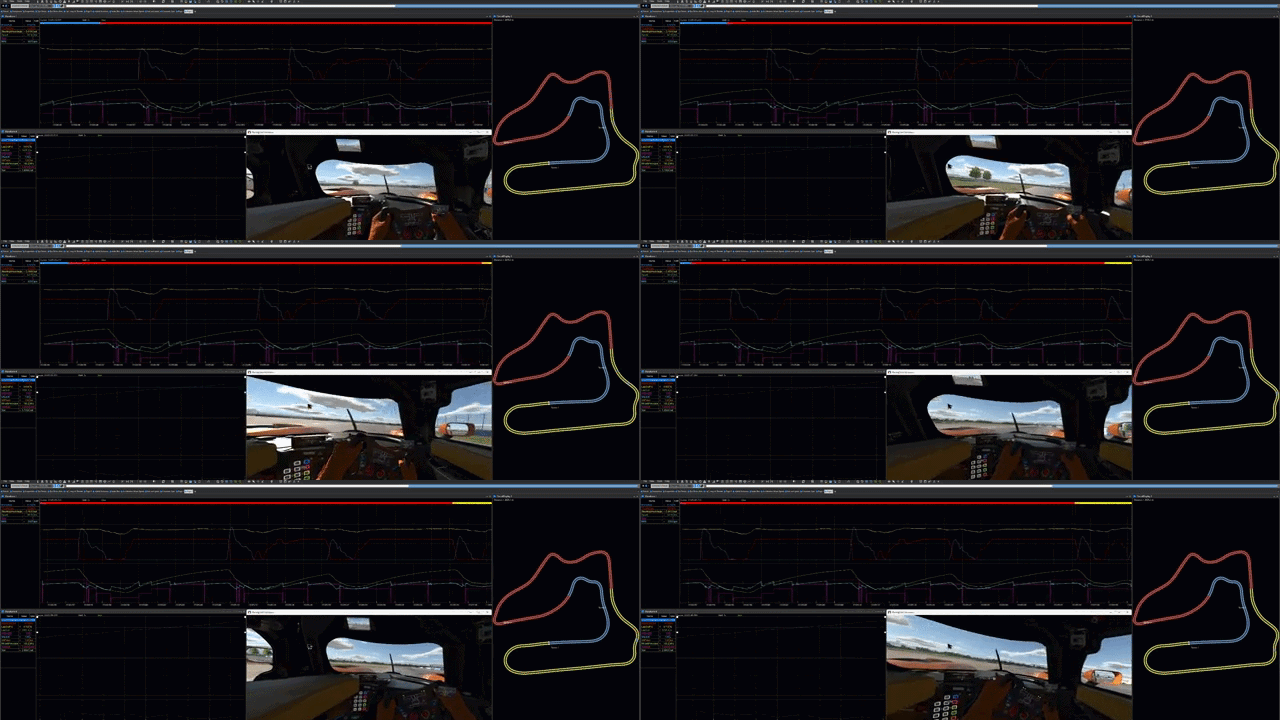
Live iRacing telemetry in ATLAS. Speed, throttle, brake traces drawing in real time. Tyre temps evolving over a stint. Lap markers dropping as I cross the line. The full professional motorsport analysis workflow — running off a sim.
The gap between professional tooling and sim racing is smaller than I thought. The Streaming Support Library doesn't care where the data comes from; it just needs the right packets in the right order. iRacing is what I plugged in, but the same pattern works for anything that produces time-series data — a kart data logger, a cycling power meter, a drone flight controller. If it has numbers and timestamps, it can go into ATLAS.
The whole thing is available for you to use. docker compose up -d --wait, run the bridge, point ATLAS at localhost:9092, and go racing. (or just start the batch script if you want to skip the command line)
What's next#
I want to see what other people do with this — different sims, different data sources, different sports entirely. If you've built something with the Streaming Support Library, or you're trying to and hitting walls (development walls, not track ones), we'd love to hear about it in the Developer Community.
Source: github.com/atlas-dev-hub/example-bridge-service-iracing